Roku vs. Fire Stick
Did you know about Roku vs. Fire Stick, if yes then this article is for you. We will be discussing. Read on for more.
If you want to cut the cord and improve your streaming TV experience, you might be wondering which device is ideal for you. The Amazon Fire TV Stick and Roku Streaming Stick are among the most popular choices available, and both are currently discounted. However, there are important differences to take into account before ending the operation.

Amazon Fire TV and Roku aim to deliver the ultimate streaming experience via dongles, branded TVs, and streaming boxes. However, selecting the appropriate device requires more than simply comparing prices.
Using the Roku Streaming Stick Plus and Fire TV Stick 4K Plus as examples, I will explore the key differences between the Fire TV and Roku streaming platforms to assist you in deciding which one aligns better with your needs and preferences.
Specifications
| Features | Fire TV Stick 4K Plus | Roku Streaming Stick Plus |
| Normal Retail Price | $50 | $40 |
| Picture quality | 4K resolution, Dolby Vision, HDR10, HDR10+ | 4K resolution, HDR10, HDR10+ |
| Frame rate | 60 FPS | 60 FPS |
| Wi-Fi | Wi-Fi 6 Dual-band | Wi-Fi 5 Dual-band |
| Ports | HDMI 2.1 output with ARC support, Micro-USB for power | HDMI 2.0b |
| Remote batteries | Two AAA batteries | Two AAA batteries |
User Interface & Experience
Roku: Clean, Simple & Neutral
The interface of Roku is frequently commended for its speed, lack of intrusiveness, and navigational ease—beneficial for users who wish to locate and view content without diversions. The home screen avoids forceful promotions and prominently displays apps and channels.
- Clean horizontal tile layout
- Minimal auto‑play previews
- Works well even on slower connections
Fire TV Stick: Dynamic but Cluttered
The interface of Amazon feels more like a content discovery platform rather than a neutral launcher. This simplifies the search for shows, particularly those on Amazon Prime; however, it results in the placement of promotions and advertisements in a prominent position on the home screen — a feature that some users deem distracting.
- Vertical + horizontal navigation
- Personalized recommendations
- Sponsored tiles & auto‑playing previews
Bottom line: Roku is superior in terms of simplicity and speed, while Fire shines if you enjoy curated recommendations and integrated shopping options.
Performance: Speed & Responsiveness
Actual performance can vary by model, but generally:
- Roku’s lightweight OS tends to feel quicker and more reliable, with fewer slowdowns as time goes on.
- The hardware of Fire TV (particularly on higher-end Sticks) can be more powerful and faster at launching apps — but the additional UI elements can sometimes cancel out any real-world speed improvements.
Roku’s interface usually remains responsive in benchmark comparisons, even after months, while the Fire TV Stick’s performance can experience slight degradation due to software bloat and heavier UI elements.
Ecosystem & Smart Features
Roku: Broad Compatibility
Roku is not linked to one specific ecosystem. It supports basic commands via Google Assistant, Alexa, and Apple HomeKit, but advanced voice control is not as extensive as that of Fire TV.

Fire TV Stick: Alexa Integration
A significant benefit of the Fire TV Stick is its thorough integration with Alexa. If you’re already using Amazon Echo, Ring, or other devices that utilize Alexa, the Fire Stick can serve as a central smart-home hub, allowing you to launch shows with your voice and manage lights, cameras, or doorbells directly from your TV screen.
Example voice commands:
- “Alexa, play The Marvels on Fire TV.”
- “Alexa, show the front door camera.”
Content & App Libraries
Both platforms offer access to all major streaming services. However:
- With Roku’s open platform, you can access thousands of channels, including niche and free ad-supported options, without brand bias.
- The Fire TV’s advantage lies in its thorough incorporation of Amazon services, such as Prime Video, Freevee, and Amazon Music.
In practice, both devices offer the same essential apps, but Roku’s universal search covers all installed channels, while Fire’s search results still prioritize Amazon content.
Remote Control & Voice Search
Roku Remotes
- Simple layout
- Some models include rechargeable batteries
- Basic voice search
- Programmable shortcut buttons on select remotes
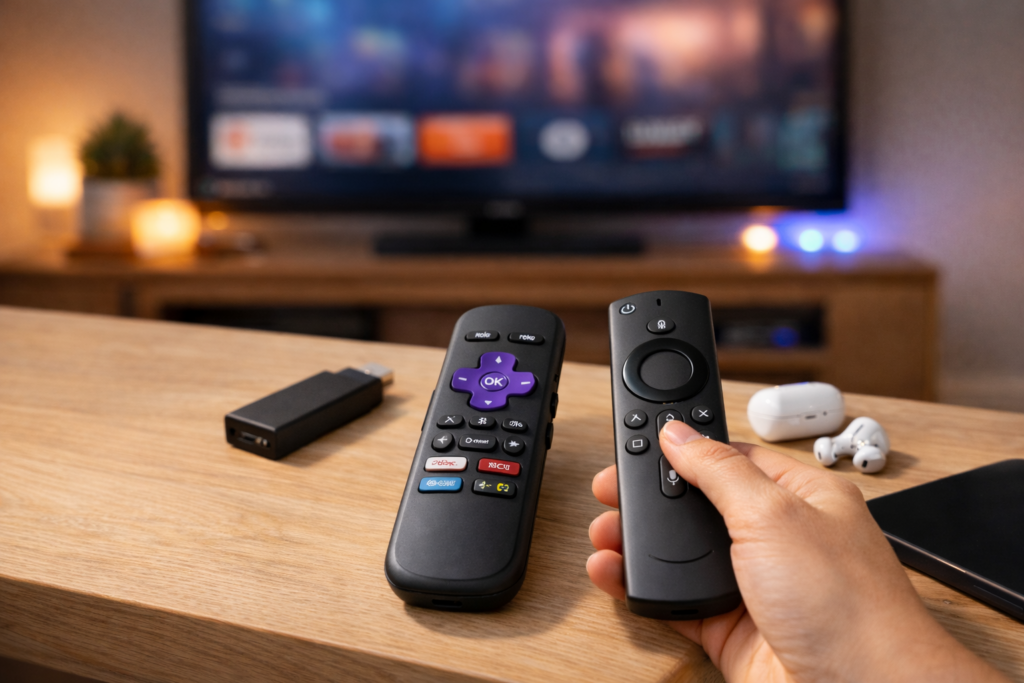
Fire TV Remotes
- Dedicated Alexa button
- Full smart‑home voice control
- Can control other AV devices via IR
- Uses replaceable AAA batteries
Fire TV has the advantage if you want a single remote for hands-free commands. If you desire playback control without frills, Roku tends to seem more uncomplicated.
Price & Value
Roku and Fire TV Sticks have competitive pricing, especially for their 4K models which are usually in the same range. There are seasonal discounts, bundles that include free trials, and exclusive offers from time to time, particularly during holidays.
Important note: Users of Fire TV may find themselves encouraged to opt for a Prime subscription to enhance their experience, which can lead to ongoing expenses. For accessing core functions on Roku, you don’t need to sign up for any service.
Also Read About The 4 Best TVs of 2026, Tested by Experts
Which Should You Buy?
The prices of Roku and Fire TV Sticks are competitive, particularly for their 4K models, which typically fall within the same range. Seasonal discounts, bundles with free trials, and exclusive offers occur from time to time, especially during holidays.
Important note: Users of Fire TV may feel prompted to choose a Prime subscription for an improved experience, which can result in recurring costs. You can access core functions on Roku without signing up for any service.
Conclusion
By 2026, streaming sticks are further developed, with Roku promoting simplicity and openness, while Fire TV provides seamless integration and experiences enhanced by AI. Your ideal choice depends on how you view, search for, and engage with your content.